Watercolor Enchanted Woodland Clipart for Design
If you’ve been searching for design assets that feel like stepping into a storybook, watercolor enchanted woodland clipart sets are worth a close look. These collections bring together soft, hand-painted textures and whimsical forest motifs—think mushrooms, ferns, foxgloves, and sleepy owls—all rendered in translucent layers of color. Unlike rigid vector graphics, watercolor clipart carries an organic warmth that can transform a flat layout into something tactile and inviting. For designers, entrepreneurs, and crafters alike, this style offers a shortcut to atmosphere without requiring you to pick up a brush yourself.
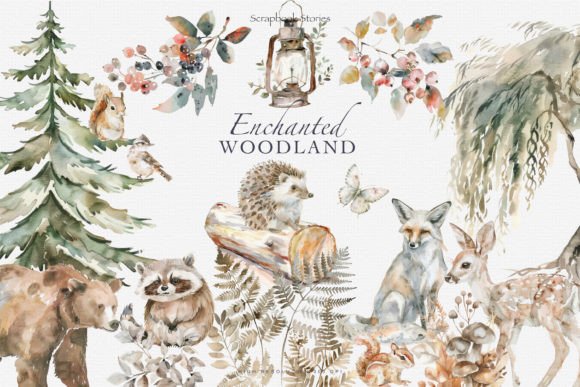
Watercolor enchanted woodland clipart sets typically include a mix of flora, fauna, and magical accents. You might find toadstools with delicate speckles, winding vines, glowing fireflies, and silhouettes of ancient trees. The palette often leans toward muted greens, earthy browns, dusty pinks, and soft golds—colors that feel both nostalgic and grounded. What makes these assets stand out is their imperfection. The uneven edges, subtle blooms, and barely-there splatters mimic the unpredictability of real watercolor on paper. That handmade quality adds depth and personality, especially when layered over digital backgrounds or paired with clean typography.
Why Watercolor Woodland Clipart Resonates with Creatives
This style appeals across a broad spectrum of projects because it strikes a balance between polished and raw. For a small business owner selling organic skincare, a set of watercolor herbs and woodland botanicals can reinforce a natural brand identity far more authentically than generic clipart. For bloggers and content creators, these elements work well as featured images, social media graphics, or email header backgrounds. The soft textures prevent the design from feeling overly corporate, while still looking intentional.
One of the strongest advantages of using watercolor enchanted woodland clipart is its ability to establish visual hierarchy without relying on heavy typography. Because the elements are soft and translucent, they can sit behind text without overwhelming it. You can place a cluster of painted ferns behind a headline, and the reader’s eye will still move naturally to the words. This makes the clipart particularly useful for editorial design in lifestyle magazines, nature-focused blogs, and children’s book layouts where the imagery needs to support rather than compete with the text.
Real-World Applications Across Projects
Here’s where watercolor enchanted woodland clipart tends to perform best:
- Branding and logo design – A single mushroom or leaf illustration can become a recognizable mark for a boutique brand. The organic style fits businesses centered around wellness, gardening, nursery decor, or handmade goods.
- Packaging design – Product labels for candles, teas, or natural soaps benefit from the muted palette and tactile feel. When printed on matte or Kraft paper, watercolor clipart looks like it was part of the package all along.
- Social media graphics – Instagram posts with watercolor backgrounds or accent elements tend to stand out in a feed dominated by bright photos and solid colors. The softness encourages users to pause and engage.
- Print projects – Wedding invitations, save-the-dates, and greeting cards with woodland themes feel personal and romantic. The same applies to wall art prints, planners, and sticker sheets.
- Web design – Subtle watercolor flourishes can serve as hero section backgrounds, hover states on buttons, or decorative borders in blog sidebars. Just be cautious with file sizes; optimized PNGs preserve the texture without slowing load times.
In each case, the clipart serves as a creative font would in typography—it sets a mood, defines the tone, and communicates a specific aesthetic without using a single word. When paired with a clean sans serif font for body text and a delicate script font for headings, the result is a cohesive look that feels both modern and timeless.
How the Clipart Influences Brand Perception and Engagement
Selecting the right visual assets directly affects how your audience perceives your professionalism and attention to detail. A watercolor enchanted woodland clipart set conveys authenticity, artistry, and a respect for craftsmanship. In an era where digital tools make it easy to create sterile, cookie-cutter designs, these organic elements signal that you care about the process. For brand identity development, this can be a differentiator. A nursery decor brand using watercolor trees and soft foxes will feel more trustworthy and nurturing than a competitor relying on flat, generic icons.
The clipart also influences audience engagement by appealing to emotion. The whimsical nature of enchanted woodland imagery often evokes nostalgia, calmness, or curiosity. When someone sees a painted forest scene on a product page or an invitation, they are more likely to pause, explore, and remember the brand. This emotional connection is harder to achieve with perfect, vector-based icons. The subtle variations in color and brushstroke give each asset a unique character, which keeps the design feeling alive rather than mass-produced.
Practical Guidance for Choosing and Using Watercolor Woodland Clipart
Not every watercolor enchanted woodland clipart set is right for every project. Here are a few things to consider before you purchase or download:
Evaluate the Color Palette and Style
Look for a set that complements your existing brand colors. If your brand uses bright, saturated hues, a muted woodland palette might clash. Conversely, if you’re aiming for a vintage or earthy look, dilute tones will work perfectly. Pay attention to the level of detail. Some sets are highly intricate with tiny leaves and roots, which look stunning in large formats but may become muddy when scaled down for social media avatars or small labels.
Check Included Formats and Licensing
Most reputable providers offer high-resolution PNG files with transparent backgrounds. This makes layering effortless. For commercial use—whether for product packaging, logo design, or client projects—verify that the license covers your intended application. Some clipart is restricted to personal use only, so read the terms carefully. If you’re a small business owner selling physical goods, invest in a commercial font or clipart license to avoid legal headaches down the road.
Test Pairings with Your Typography
Watercolor elements look best when balanced by clean, restrained typography. A heavy or ornate typeface will compete with the clipart’s texture. Instead, try pairing watercolor woodland motifs with a serif font that has classic proportions for a refined look, or a handwritten font that echoes the organic feel. For example, a gentle script atop a watercolor moss background can create a romantic, handcrafted invitation. A simple sans serif over a cluster of painted acorns can keep a modern brand identity from feeling too fussy.
Consider Readability and Visual Balance
Because watercolor textures have soft edges, they can reduce contrast in your design. Ensure that text placed over the clipart has enough opacity or a subtle drop shadow to remain legible. High contrast works best: dark text on a light wash, or white text on a darker painted area. Avoid placing body text directly over highly detailed sections of the clipart. Reserve those busy areas for decorative purposes, and let your key messages sit on cleaner sections.
Observations and Recommendations from a Designer’s Perspective
Having worked with both vector and watercolor assets, I’ve noticed that watercolor enchanted woodland clipart sets require a slightly different approach to composition. Because each element has a natural boundary—an uneven edge, a soft fade—you can’t always line things up perfectly. That’s actually the point. Embrace the imperfections. Let a mushroom lean slightly, allow a leaf to overlap a border. The charm comes from this organic arrangement.
One recommendation is to treat the clipart as layers rather than standalone stickers. Build scenes by stacking multiple elements at varying opacities. For instance, place a light wash of painted trees in the background, then add a darker, more detailed flower in the foreground. This creates depth and makes your design feel like an illustration rather than a collage. You can also import the PNGs into vector software and adjust the colors, resize, or rotate without losing texture quality, provided you maintain high resolution.
For those new to working with design assets like these, start with a single focal element. Use it as a display font would be used in a heading—as the visual anchor of your page. Build the rest of the layout around that piece. It saves time and prevents your design from becoming visually noisy. As you gain confidence, combine multiple elements to tell a story. A set of painted acorns, a fox, and a vine, for example, can become a cohesive illustration for a website hero section or a book cover.
Finally, remember that watercolor enchanted woodland clipart is a tool for enhancing your own creative vision, not a crutch. The best results come when you treat these assets as part of a broader modern typography strategy, balanced with white space, thoughtful font pairing, and a clear hierarchy. When everything works together, your audience sees a polished, professional product—one that feels handcrafted without looking unfinished.